





RUT955 – Професионален мобилен рутер с NTRIP протокол -Две SIM 4G/Wi-Fi
305.00 €
Селскостопанските машини напреднаха много през последните години, като технологии като модерни трактори или комбайни обикновено струват повече от спортна кола – от съществено значение е да се следи за такива ценни активи. С нашето решение ще имате пълен контрол върху текущата позиция, дейностите на водача и ще получавате различна информация от машината за прибиране на реколтата.
Професионален мобилен рутер с две SIM 4G LTE / WiFi и с NTRIP протокол. Силно, сигурно и надеждно индустриално устройство, оборудвано с Ethernet, цифрови и аналогови I/O, RS232, RS485, GNSS (GPS), microSD и USB интерфейси.
КОМПЛЕКТЪТ СЪДЪРЖА:
- Рутер RUT955
- Захранване – евро стандарт
- 2 LTE антени (магнитно закрепване, SMA мъжки, 3 м кабел)
- 2 x WiFi антени (магнитно закрепване, RP-SMA мъжки, 1.5 м кабел)
- GNSS антена (лепило, SMA мъжки, 3 m кабел)
- RS485 съединителен блок
- I/O съединителен блок
- Ethernet кабел (1,5 м)
- QSG (Ръководство)
RUT955 е високо надежден и сигурен LTE рутер с I/O, GNSS и RS232/RS485 за професионални приложения. Рутер осигуряващ висока производителност, клетъчна комуникация и GPS възможности за местоположение. RUT955 е снабден с подсигуряване на връзката чрез двойно прекъсване на SIM картата. Външните антенни конектори позволяват да се прикачат желаните антени и лесно да се намери най-доброто местоположение на сигнала.

https://www.youtube.com/watch?v=9f7HiY5R0ZA
RUT955 – Първи стъпки
This Wiki page contains the online version of the Quick Start Guide (QSG) for the RUT955 LTE Router. Here you will find an overview of the various components found on the front and back sides of a RUT955 device, basic hardware installation, first login information, device specifications and general safety information. It is highly recommended that you acquaint yourself with with the Quick Start Guide before using the device. If you own a RUT955 device, you can also find a printed version of the Quick Start Guide in the device’s package.

Contents
Front view
| No. | Description | |
|---|---|---|
| 1 | LAN Ethernet ports | |
| 2 | WAN Ethernet port | |
| 3 | LAN LEDs | |
| 4 | WAN LED | |
| 5 | RS485 interface |
 |
| 6 | Power socket | |
| 7 | RS232 interface | |
| 8 | Input/Output connector | |
| 9 | Power LED | |
| 10 | Mobile connection status LED | |
| 11 | Mobile signal strength indication LEDs |
Back view
| No. | Description |
 |
|---|---|---|
| 1 | LTE antenna connectors | |
| 2 | GPS antenna connector | |
| 3 | USB connector | |
| 4 | WiFi antenna connectors | |
| 5 | Reset button | |
| 6 | SIM card slots |
Connectors
| Power Socket Pinout |
 |
||
|---|---|---|---|
| No. | Description | Wire color | |
| 1 | Power | Red | |
| 2 | Ground | Black | |
| 3 | I/O | Green | |
| 4 | I/O | White | |
| . | |||
Hardware installation
- Remove the SIM card slot tray(s) with the pin needle. Insert your SIM card(s) and push the tray(s) back into the router. Correct SIM card orientation can be seen in the figure below:

- Attach LTE, WiFi and GPS antennas
- Connect the power adapter to the power socket located on the front panel of the device. Then plug the other end of the power adapter into a power outlet.
- Connect to the device wirelessly (SSID: RUT955_****) or use an Ethernet cable.

Configure your computer (Windows)
-
- Enable the wireless network connection (go to Start → Control Panel → Network and Internet → Network and Sharing Center. In the left panel click the Change adapter settings link. Right click on Wireless Network Connection and select Enable).

- Enable the wireless network connection (go to Start → Control Panel → Network and Internet → Network and Sharing Center. In the left panel click the Change adapter settings link. Right click on Wireless Network Connection and select Enable).

-
- Setup wireless network adapter on your computer (right click on Wireless Network Connection and select Properties. After that select Internet Protocol Version 4 (TCP/IP)and click Properties).
- Select Obtain IP address and Obtain DNS server address automatically if they are not selected. Click OK.


-
- Right click on Wireless Network Connection and select Connect to see available wireless networks.

- Right click on Wireless Network Connection and select Connect to see available wireless networks.

- Choose the wireless network RUT955_**** from the list and click Connect. Enter the WiFi password located on the device’s label.


Login to device
-
- To enter the router’s Web interface (WebUI), type http://192.168.1.1 into the URL field of your Internet browser.
- Use the following login information when prompted for authentication:


- After you login, you will be prompted to change your password for security reasons. The new password must contain at least 8 characters, including at least one uppercase letter, one lowercase letter and one digit. This step is mandatory and you will not be able to interact with the router’s WebUI before you change the password.
- When you change the router’s password, the Configuration Wizard will start. The Configuration Wizard is a tool used to setup some of the router’s main operating parameters.
- Go to the Status → Network page and pay attention to the Signal Strength indication. To maximize cellular performance try adjusting the antennas or changing the location of your device to achieve the best signal conditions (you can find information on signal strength recommendations here).


Safety information
The RUT955 router must be used in compliance with any and all applicable national and international laws and with any special restrictions regulating the utilization of the communication module in prescribed applications and environments.
| Radio specifications | |
|---|---|
| RF technologies | GSM, GPRS, EDGE, UMTS/HSPA+, LTE, GNSS, WiFi |
| Max. RF power | 33 dBm@GSM, 24 dBm@WCDMA, 23 dBm@LTE, 20 dBm@WiFi |
| Bundled accessories specifications* | |
| Power | AC/DC power adapter 9 V 1 A, 4 pin plug |
| GSM/WCDMA/LTE antenna | 698~868/1850~2690 MHz, 50 Ω, VSWR < 2, gain** 2 dBi, omnidirectional, SMA male connector |
| WiFi antenna | 2400~2483.5 MHz, 50 Ω, VSWR < 2, gain** 2 dBi, omnidirectional, RP-SMA male connector |
| GNSS antenna | 1575.42~1602 MHz, 2.2~5 VDC, VSWR < 1.5, active total gain** 28 dB (typ.), RHCP polarization, SMA male connector |
* Order code dependent.
** Higher gain antenna can be connected to compensate for cable attenuation when a cable is used. The user is responsible for the compliance with the legal regulations.
 This sign on the package means that is necessary to read the User’s Manual before you start using the device
 This sign on the package means that all used electronic and electric equipment should not be mixed with general household waste
 Hereby, Teltonika declares that the radio equipment type RUT955 is in compliance with Directives: 2014/53/EU, 2014/35/EU, 2014/30/EU. The full text of the EU declaration of conformity is available at the following internet address: http://teltonika.lt/product/rut955/
RUT955 – Използва се в:

AGRICULTURE
Agricultural machinery has advanced a lot in recent years, technology like modern tractors or harvesters usually costs more than a sports car – it is essential to keep track of such valuable assets. With our solution you will have full control of current position, driver activities and receive various information from harvesting machinery.

AUTOMATED MERCHANDISING
Vending sector is one of the most competitive and user experience-sensitive business. IoT solutions provided for this sector enables our clients to do both reduce costs and ensure the best customer experience. Stable and reliable internet connection allows vending companies to see the status of every vending machine and ensure that customer will always find a fully functioning machine with merchandise he is looking to buy. Wireless connectivity allows flexibility for vending companies which is crucial in maximizing revenues by changing vending machine locations.

AUTOMOTIVE INDUSTRY
Teltonika provides an amazing solution for public transport which enables to integrate modern digital pay systems into city public transport. WiFi connection service serves as an added value to the passengers.

ENERGY SECTOR
Nowadays, when the whole world is trying to solve pollution problems, many households are using wireless technologies to modernize traditional energy infrastructure and create “smart grids”. Teltonika provides networking solutions for smart metering which is one of the most important elements in the smart grid infrastructure.A

SCADA SYSTEMS
Today more and more businesses lean towards innovation in order to assure effectiveness and cost efficiency. For many of them SCADA system automation is the key field of investment to meet the changing industry standards. Teltonika IoT solutions helps to overcome the connectivity challenges which are very common in SCADA automation projects. Teltonika RUT devices assures safety and reliability as well as solves the problem assuring the stable internet connection even in the most remote locations.
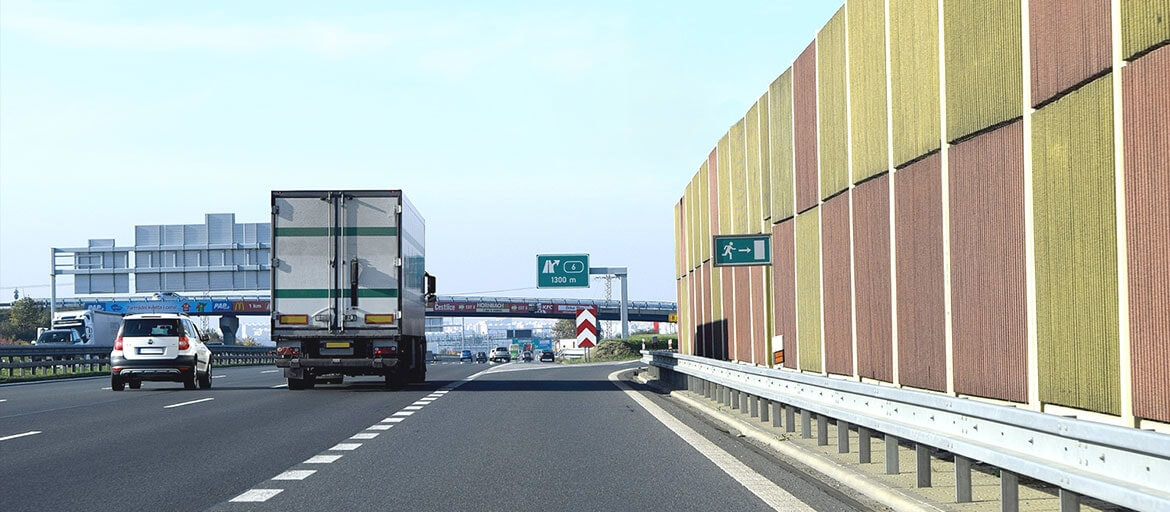
SMART CITY
Transport for Cape Town (TCT) recently installed a 3D laser detection system in Muizenberg to prevent vehicles with a height of over 2.5m from crashing into the low railway bridge at Atlantic Road. In this solution RUT955 ensures reliable and secure remote monitoring from the Transport Management Centre.
Additional information
| Weight | 0.28 kg |
|---|---|
| Dimensions | 8 × 10.6 × 4.6 cm |
Файлове за изтегляне *
-
RUT955 DATASHEET (EN)
Updated 2019-06-12
-
RUT955 USER MANUAL (EN)
Updated 2019-04-16
-
RUT955 QUICK START GUIDE (EN)
Updated 2019-03-18
-
CERTIFICATIONS & APPROVALS
-
FIRMWARE DOWNLOADS
-
PRODUCT CHANGE NOTIFICATIONS
-
SDK DOWNLOADS
-
GPL DOWNLOADS
Reviews
There are no reviews yet.