





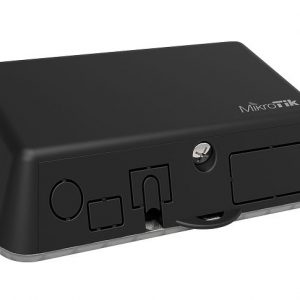
TRB140 – Индустриален 4G LTE IoT рутер
165.00 €
Малък и бърз за внедряване на индустриален интернет – 4G LTE IoT рутер. Разширената функционалност на VPN, възможностите за сигурност и отдалеченото управление правят TRB140 най-добрата възможност за свързване на едно устройство.
КОМПЛЕКТЪТ СЪДЪРЖА:
- TRB140
- 1 x LTE антена (магнитно поставяне, SMA male, 3 m кабел)
- Захранване – Евро стандарт
- Micro-USB кабел (0.8 m)
- LAN кабел
- упътване
Преди поръчка се обадете за актуална цена – 0888 817438
Промишленият LTE Cat 4 Gateway Board TRB140 е снабден с един Ethernet порт, цифрови входове / изходи и micro-USB порт. Компактният дизайн на TRB140 го прави перфектен за приложение, при което едно устройство трябва да има надеждна интернет връзка. TRB140 е проектиран да се използва за индустриално приложение, затова разполага с широка гама от софтуерни функции, като управление на SMS, Firewall, Open VPN, IPsec, RMS и FOTA поддръжка.
ЧЕСТОТА:
- 4G (LTE-FDD): B1, B3, B7, B8, B20, B28A
- 4G (LTE-TDD): B38, B40, B41
- 3G: B1, B8
- 2G: B3, B8

TRB140 first start
This Wiki page contains the online version of the Quick Start Guide (QSG) for the TRB140 LTE Ethernet Gateway. Here you will find an overview of the various components found on the front and back sides of a TRB140 device, basic hardware installation, first login information, device specifications and general safety information. It is highly recommended that you acquaint yourself with with the Quick Start Guide before using the device. If you own a TRB140 device, you can also find a printed version of the Quick Start Guide in the device’s package.

Front view
| No. | Description |
 |
|---|---|---|
| 1 | Power LED | |
| 2 | Power socket | |
| 3 | Ethernet port | |
Back view
| No. | Description |
 |
|---|---|---|
| 1 | SIM card slot | |
| 2 | Mobile antenna connector | |
| 3 | Mobile connection type LEDs | |
| 4 | Mobile signal strength indication LEDs | |
| 5 | USB connector | |
| 6 | Reset button | |
Connectors
|
 |
|||||||||||||||||||||
Device configuration
1. Power on the device and connect the USB cable to your computer.
2. Allow the gateway to boot up. This might take up to 30 s.
3. Your computer’s OS should detect the USB device and install the drivers for the virtual NDIS network adapter. IP address is set automatically via DHCP.
4. Use a Web browser to go to gateway’s default address: http://192.168.2.1
5. Use the following credentials to login:

6. Go to the WebUI’s Status → Overview page to check the signal strength:

Safety information
TRB140 gateway must be used in compliance with any and all applicable national and international laws and with any special restrictions regulating the utilixation of the communication module in prescribed applications and environments.
| Radio specifications | |
|---|---|
| RF technologies | GSM, GPRS, EDGE, UMTS/HSPA+, LTE |
| Max. RF power | 32 dBm@GSM, 24 dBm@WCDMA, 23 dBm@LTE |
| Bundled accessories specifications* | |
| Power | AC/DC power adapter 9 V, 1 A, 4 pin plug |
| GSM/WCDMA/LTE antenna | 698~868/1850~2690 MHz, 50 Ω, VSWR ≤ 2, gain** 2 dBi, omnidirectional, SMA male connector |
* Order code dependent.
** Higher gain antenna can be connected to compensate for cable attenuation when a cable is used. The user is responsible for the compliance with the legal regulations.
 This sign on the package means that is necessary to read the User’s Manual before you start using the device
 This sign on the package means that all used electronic and electric equipment should not be mixed with general household waste
TRB140 Configuration Examples
This page contains various configuration guides for TRB140. Unlike the articles in the TRB140 Manual, which provide more general knowledge on all of the router’s features and functions, these guides are more in-depth and are usually focused on specific configuration scenarios with extensive explanations. While most of the guides apply to both Windows and Linux Operating Systems, some are exclusive to one OS and others aren’t OS specific in any way and apply to any system.
Router control and monitoring
Modem control
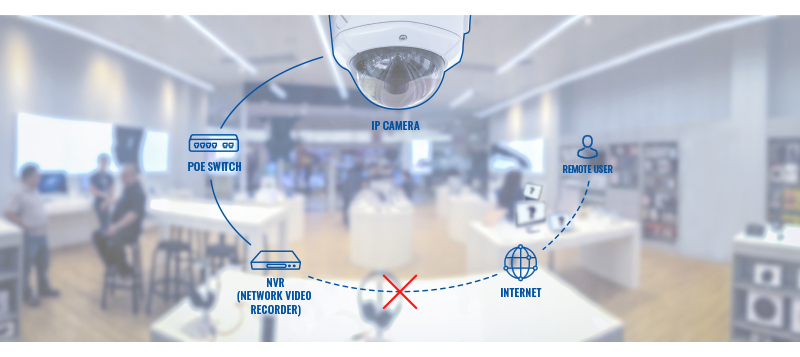
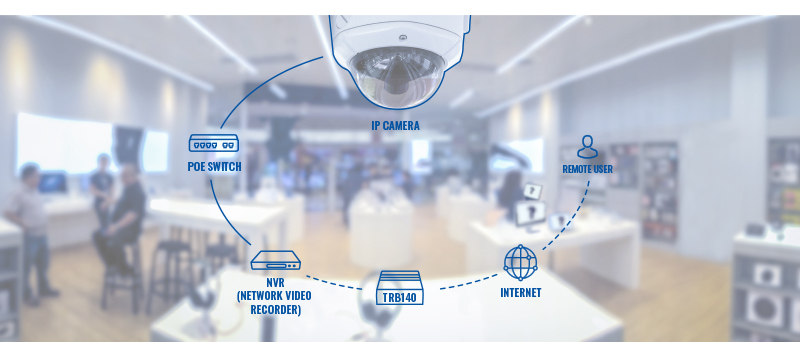
Camera
Допълнителна информация
| Тегло | 0.13 kg |
|---|---|
| Размери | 6 × 7 × 1.8 cm |


Reviews
There are no reviews yet.